PowerPoint Gantt and timeline planning

DeckForge

PowerPoint Gantt chart software for executive plans.

30-day free trial. No charge today. Beta discount locked in after the trial.

Build presentation-ready timelines, milestones, dependencies, phase bands, launch waves, and project roadmap slides for the deck your stakeholders already use. One licensed editor can keep the plan moving while colleagues still view the same DeckForge HTML material.

PowerPoint
Built for stakeholder decks
HTML
Shareable project views
Edit access
Controlled by license
View-only
HTML sharing for colleagues

DeckForge is for PowerPoint project plans that need to survive the executive meeting, not just the project database.

  • Clear rollout stories
  • Calendar-based phases
  • PowerPoint-ready delivery
  • Shareable HTML views

One focused workflow for PowerPoint timelines.

Build, update, present, and share project timelines from the PowerPoint workflow your stakeholders already use.

DeckForge for PowerPoint

For presentation builders who need fast, editable timelines in the deck.

  • Live PowerPoint add-in and HTML app workflow
  • Individual subscription, trial, and license check
  • Timeline state follows the PowerPoint presentation workflow
  • Built for consultants, founders, project leads, and PMO teams
Start free trial

Workflow

From moving plan to readable PowerPoint Gantt chart.

01

Shape the plan

Create rows, swim lanes, task bars, milestones, dependencies, and labelled phase ranges.

02

Make it meeting-ready

Tune colour, separators, status markers, date scales, baselines, and presentation mode.

03

Edit once, share widely

The licensed user keeps editing power, while colleagues can still view DeckForge material in the same HTML format.

Product view

A timeline maker built for the slide canvas.

Timeline tools often bury the story in project-management detail. DeckForge focuses on the communication layer: what changed, what depends on what, and what needs attention before the next review.

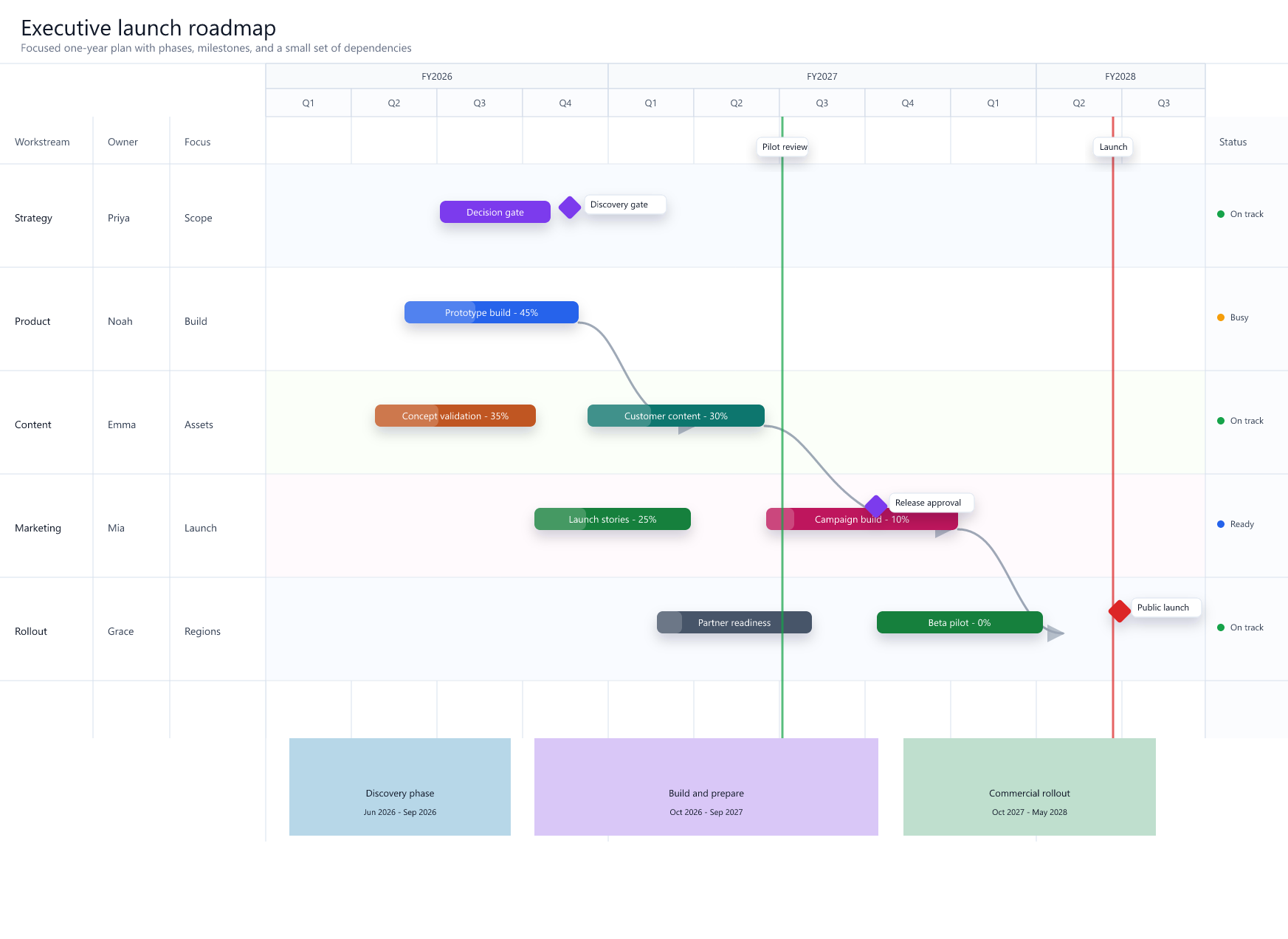
DeckForge Gantt interface with task bars, milestones, dependencies, phases, and status lanes

Features

The Gantt chart and timeline controls executives expect to see.

Timeline structure

Fiscal years, quarters, months, visible separators, phase brackets, and custom date ranges.

Gantt storytelling

Task bars, percentage labels, dependency paths, baselines, milestones, flags, and status lanes.

PowerPoint delivery

Hosted add-in routes for the task pane and embedded HTML object, ready for PowerPoint workflows.

Commercial licensing

30-day Stripe trials with visible beta user discounts, secure emailed edit access, and Snoaper admin visibility.

Viewer sharing

Only one person needs edit access to keep the project current. Colleagues can view shared HTML output without blocking the plan owner.

Use cases

Designed for the plans people present repeatedly.

Product rollouts Transformation programmes Client delivery plans Launch readiness reviews PMO status reports Executive roadmap slides

PowerPoint planning software

Make Gantt charts, timelines, and roadmap slides without rebuilding every shape.

DeckForge gives product managers, project leads, consultants, and PMO teams a focused way to turn real dates into clear PowerPoint planning views. It is built around slide-ready objects: task bars, milestones, dependencies, phase labels, swim lanes, baselines, and status markers.

  • Use it as a PowerPoint Gantt chart maker for executive updates.
  • Create project timelines and rollout plans with labelled phases.
  • Share viewable HTML project material with colleagues while keeping edit access licensed.
  • Keep free-trial, monthly, yearly, and beta discount status visible through license checks.

Pricing

Try DeckForge free for 30 days.

DeckForge is currently in beta. Normal pricing will be $9.95 per month and $80 per year, but beta subscribers keep their discounted rate for the lifetime of the subscription. There is no charge today. Your first payment is collected after the 30-day free trial unless you cancel before then.

Monthly 50% beta discount Normally $9.95/mo $4.95

30-day free trial, then recurring monthly beta billing for licensed editing.

Start monthly trial

FAQ

DeckForge pricing and license questions.

Is DeckForge for PowerPoint Gantt charts?

Yes. DeckForge is built for slide-ready Gantt charts, project timelines, roadmap views, milestones, dependencies, and executive rollout plans.

Is yearly billing a subscription?

Yes. The yearly option is a recurring subscription that renews once per year after the 30-day free trial. Beta users pay $40 per year instead of the normal $80 yearly price.

How much does DeckForge cost?

There is no charge for the first 30 days. After the trial, DeckForge costs $4.95 on a recurring monthly subscription or $40 on a recurring yearly subscription. Normal pricing will be $9.95 monthly or $80 yearly.

When is the first payment taken?

Stripe starts a 30-day free trial at checkout. The first payment is collected after the trial ends unless the subscription is cancelled before then.

How do I cancel?

Use the Cancel subscription button at the top of the site or go to /cancel/. Enter the email used at checkout and DeckForge sends a secure confirmation link to that address. Confirm from the email link to schedule cancellation. If you cancel during the trial, no payment is taken.

Does the beta discount expire?

No. The 50% beta user discount is applied to the Stripe subscription and lasts for the lifetime of that subscription after the free trial.

Can colleagues view DeckForge material without a license?

Yes. The subscription controls editing access. Colleagues can still view shared DeckForge material in HTML format, so one licensed editor can manage the plan while the wider team reviews it.

How is the license checked?

Use the email from Stripe checkout to check active subscription access. License status is also visible in the Snoaper admin area for management.

License access

Check trial or subscription access.

Use the email from Stripe checkout to confirm active trial or subscription access. For team seats or PowerPoint deployment support, send a note for follow-up.